Pendulum Watch

Tampilkan postingan dengan label Operating System. Tampilkan semua postingan

Selasa, 28 Agustus 2012

Zorin OS : Sistem Operasi Linux Mirip Windows 7


"Zorin OS" adalah sistem operasi multi-fungsional yang dirancang khusus untuk pengguna Windows yang ingin memiliki akses yang mudah ke Linux. OS ini didasarkan pada Ubuntu yang merupakan sistem operasi yang paling populer di dunia Linux.

Zorin OS datang dengan antarmuka seperti Windows 7 secara default untuk secara dramatis mengurangi waktu mempelajari sistem ini sementara anda masih mendapati keuntungan utama dari Linux. Pengguna juga dapat memanfaatkan desktop mereka dengan antarmuka lainnya.

Zorin OS dengan fitur Look Changer yang unik yang telah dibuat khusus untuk Zorin OS. Hal ini memungkinkan pengguna untuk mengubah antarmuka pengguna dengan cepat dan mudah. Program unik lainnya termasuk Splash Screen Manager, Internet Browser Manager dan Background Plus. Ini memungkinkan Anda mengubah desktop Anda untuk melihat dan bertindak seperti Windows 7, XP, Vista, 2000, Mac OS X atau Linux (GNOME) untuk kemudahan penggunaan
Zorin_Linux_OS.png.

Zorin OS memberikan pengguna lebih banyak fleksibilitas. Hal ini memungkinkan Anda untuk menggunakan Zorin OS bersama sistem operasi Anda saat ini dan menjalankan program Microsoft Windows di Zorin OS dengan bantuan WINE dan PlayOnLinux.

Sistem operasi OS Zorin memberi Anda pengalaman desktop utama. Beberapa keuntungan dari Zorin OS:
- Tidak ada risiko terkena virus
- Jauh lebih cepat dari Windows 7
- Sebuah desktop yang mudah digunakan dan familiar
- Antarmuka pengguna yang dapat di-kustomisasi
- Stabil karena didasarkan pada sistem operasi Linux yang kuat
- Semua perangkat lunak yang anda butuhkan tersedia
- Perangkat lunak sangat fleksibel dan disesuaikan Open Source
- Tersedia dalam lebih dari 55 bahasa
Orang-orang dalam ketakutan virus dan malware di dunia digital. Berkat kekebalan Zorin OS terhadap virus Windows, anda tidak perlu khawatir tentang hal ini. Zorin OS juga dilengkapi dengan software firewall terintegrasi untuk menjaga sistem anda aman secara ekstra. Ketika potensi ancaman keamanan muncul, pembaruan perangkat lunak biasanya datang dalam hitungan jam melalui Update Manager. Dengan Zorin OS Anda yakin untuk memiliki ketenangan pikiran.

Tertarik? Silahkan langsung menuju TKP >>> http://zorin-os.com/free.html

Sumber askvg.com

Selasa, 18 Oktober 2011

XP Machine

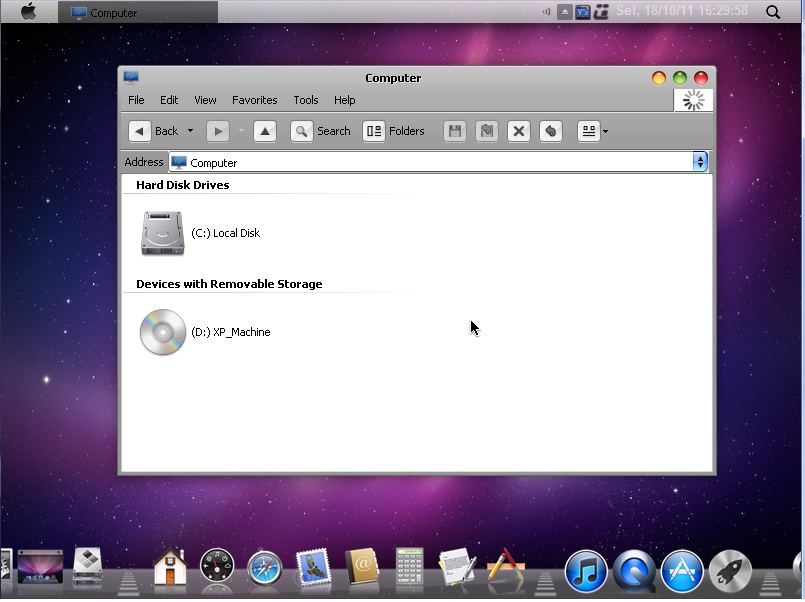
Hiuugghhh.....akhirnya selesai juga ngeracik Win XP rasa apel. hehehe...ya...sebuah cd windows xp dengan update terkini dan visual style Apple Machintosh. Berikut SS-nya...


Update dan add-on yg terintegrasi :
- XPSP3_QFE_UpdatePack_Oktober 2011
- DotNetFx AIO (v 1.1, v2.0, v3.0, v3.5)
- Internet Explorer 8
- WMP11
- Uber Icon
- YzShadow
- KeyVolume (perbesar/perkecil volume via keyboard)
- cdEjectLoad (Eject dan Load optical drive via keyboard)
- RocketDock
- tClock
- Kel's CPL Bonus 12.6 (kumpulan beberapa aplikasi di Control Panel)

Item yg di-remove :
;# Applications #
Briefcase
ClipBook Viewer
Internet Games
Pinball
;# Drivers #
Cameras and Camcorders
Display Adapters
Ethernet (LAN)
Modems
Printers
Scanners
Sound Controllers
Wireless Ethernet (WLAN)
;# Keyboards #
Albanian keyboard
Arabic (101) keyboard
Arabic (102) AZERTY keyboard
Arabic (102) keyboard
Armenian Eastern keyboard
Armenian Western keyboard
Azeri Cyrillic keyboard
Azeri Latin keyboard
Belarusian keyboard
Belgian (Comma) keyboard
Belgian (Period) keyboard
Belgian French keyboard
Bengali (Inscript) keyboard
Bengali keyboard
Bosnian Cyrillic keyboard
Bosnian keyboard
Bulgarian (Latin) keyboard
Bulgarian keyboard
Canadian French (Legacy) keyboard
Canadian French keyboard
Canadian Multilingual Standard keyboard
Chinese (Simplified) - Microsoft Pinyin IME 3.0 keyboard
Chinese (Simplified) - NeiMa keyboard
Chinese (Simplified) - QuanPin keyboard
Chinese (Simplified) - ShuangPin keyboard
Chinese (Simplified) - US Keyboard keyboard
Chinese (Simplified) - ZhengMa keyboard
Chinese (Traditional) - Alphanumeric keyboard
Chinese (Traditional) - Array keyboard
Chinese (Traditional) - Big5 Code keyboard
Chinese (Traditional) - ChangJie keyboard
Chinese (Traditional) - DaYi keyboard
Chinese (Traditional) - New ChangJie keyboard
Chinese (Traditional) - New Phonetic keyboard
Chinese (Traditional) - Phonetic keyboard
Chinese (Traditional) - Quick keyboard
Chinese (Traditional) - Unicode keyboard
Chinese (Traditional) - US Keyboard keyboard
Croatian keyboard
Czech (QWERTY) keyboard
Czech keyboard
Czech Programmers keyboard
Danish keyboard
Devanagari - INSCRIPT keyboard
Divehi Phonetic keyboard
Divehi Typewriter keyboard
Dutch keyboard
Estonian keyboard
Faeroese keyboard
Farsi keyboard
Finnish keyboard
Finnish with Sami keyboard
French keyboard
FYRO Macedonian keyboard
Gaelic keyboard
Georgian keyboard
German (IBM) keyboard
German keyboard
Greek (220) keyboard
Greek (220) Latin keyboard
Greek (319) keyboard
Greek (319) Latin keyboard
Greek keyboard
Greek Latin keyboard
Greek Polytonic keyboard
Gujarati keyboard
Hebrew keyboard
Hindi Traditional keyboard
Hungarian 101-key keyboard
Hungarian keyboard
Icelandic keyboard
Inuktitut Latin keyboard
Irish keyboard
Italian (142) keyboard
Italian keyboard
Japanese Input System (MS-IME2002) keyboard
Japanese keyboard
Kannada keyboard
Kazakh keyboard
Korean Input System (IME 2000) keyboard
Korean keyboard
Kyrgyz Cyrillic keyboard
Latin American keyboard
Latvian (QWERTY) keyboard
Latvian keyboard
Lithuanian IBM keyboard
Lithuanian keyboard
Luxembourgish keyboard
Malayalam keyboard
Maltese 47-key keyboard
Maltese 48-key keyboard
Maori keyboard
Marathi keyboard
Mongolian Cyrillic keyboard
Nepali keyboard
Norwegian keyboard
Norwegian with Sami keyboard
Pashto keyboard
Polish (214) keyboard
Polish (Programmers) keyboard
Portuguese (Brazilian ABNT) keyboard
Portuguese (Brazilian ABNT2) keyboard
Portuguese keyboard
Punjabi keyboard
Romanian keyboard
Russian (Typewriter) keyboard
Russian keyboard
Sami Extended Finland-Sweden keyboard
Sami Extended Norway keyboard
Serbian (Cyrillic) keyboard
Serbian (Latin) keyboard
Slovak (QWERTY) keyboard
Slovak keyboard
Slovenian keyboard
Spanish keyboard
Spanish Variation keyboard
Swedish keyboard
Swedish with Sami keyboard
Swiss French keyboard
Swiss German keyboard
Syriac keyboard
Syriac Phonetic keyboard
Tamil keyboard
Tatar keyboard
Telugu keyboard
Thai Kedmanee (non-ShiftLock) keyboard
Thai Kedmanee keyboard
Thai Pattachote (non-ShiftLock) keyboard
Thai Pattachote keyboard
Turkish F keyboard
Turkish Q keyboard
Ukrainian keyboard
United Kingdom Extended keyboard
United Kingdom keyboard
United States-Dvorak for left hand keyboard
United States-Dvorak for right hand keyboard
United States-Dvorak keyboard
Urdu keyboard
US English Table for IBM Arabic 238_L keyboard
Uzbek Cyrillic keyboard
Vietnamese keyboard
;# Languages #
;Arabic
Arabic (Algeria)
Arabic (Bahrain)
Arabic (Egypt)
Arabic (Iraq)
Arabic (Jordan)
Arabic (Kuwait)
Arabic (Lebanon)
Arabic (Libya)
Arabic (Morocco)
Arabic (Oman)
Arabic (Qatar)
Arabic (Saudi Arabia)
Arabic (Syria)
Arabic (Tunisia)
Arabic (U.A.E.)
Arabic (Yemen)
Divehi (Maldives)
Pashto
Syriac (Syria)
Urdu
;Armenian
Armenian
;Baltic
Estonian
Latvian
Lithuanian
;Central Europe
Albanian
Bosnian (Latin, Bosnia and Herzegovina)
Croatian
Croatian (Bosnia and Herzegovina)
Czech
Hungarian
Polish
Romanian
Serbian (Latin)
Serbian (Latin, Bosnia and Herzegovina)
Slovak
Slovenian
;Cyrillic
Azeri (Cyrillic)
Belarusian
Bosnian (Cyrillic, Bosnia and Herzegovina)
Bulgarian
FYRO Macedonian
Kazakh
Kyrgyz (Kyrgyzstan)
Mongolian (Mongolia)
Russian
Serbian (Cyrillic)
Serbian (Cyrillic, Bosnia and Herzegovina)
Tatar
Ukrainian
Uzbek (Cyrillic)
;Georgian
Georgian
;Greek
Greek
;Hebrew
Hebrew
;Indic
Bengali (India)
Gujarati (India)
Hindi
Kannada (India)
Konkani
Malayalam (India)
Marathi
Nepali (Nepal)
Punjabi (India)
Sanskrit
Tamil
Telugu (India)
;Japanese
Japanese
;Korean
Korean
;Simplified Chinese
Chinese (PRC)
Chinese (Singapore)
;Thai
Farsi
Thai
;Traditional Chinese
Chinese (Hong Kong S.A.R.)
Chinese (Macau S.A.R.)
Chinese (Taiwan)
;Turkic
Azeri (Latin)
Turkish
Uzbek (Latin)
;Vietnamese
Vietnamese
;# Multimedia #
Images and Backgrounds
Intel Indeo codecs
Movie Maker
Music Samples
Old CDPlayer and Sound Recorder
Speech Support
Tablet PC
Windows Sounds
;# Network #
MSN Explorer
Netmeeting
Windows Messenger
;# Operating System Options #
.NET Framework
Color Schemes
Desktop Cleanup Wizard
File and Settings Wizard
Help and Support
Manual Install and Upgrade
MS Agent
Out of Box Experience (OOBE)
Search Assistant
Service Pack Messages
Tour
;# Services #
Error Reporting
Fax Service
IMAPI CD-Burning COM Service
Indexing Service
System Restore Service

Registry Tweak :
Boot and Shutdown-Auto-End tasks immediately
Boot and Shutdown-Auto-Kill hung applications immediately
Boot and Shutdown-Auto-Kill hung services immediately
Boot and Shutdown-Setup Prefetch-Cache-Applaunch and Boot enabled
Desktop-Desktop icons size-32
Desktop-Internet Explorer icon-Hide
Desktop-My Computer icon-Hide
Desktop-My Documents icon-Hide
Desktop-My Network Places icon-Hide
Desktop-Recycle Bin icon-Hide
Desktop-Wrap icon titles-Enable
Explorer-Add (un)register libraries in Context Menu
Explorer-Add 'Command Prompt' to folder context menu
Explorer-Advanced Search: preconfigure options
Explorer-Associate additional file types with Notepad
Explorer-Classic Control Panel
Explorer-Disable Accessibility keyboard shortcuts
Explorer-Disable Autorun
Explorer-Disable Beep on errors
Explorer-Disable Prefix: Shortcut to
Explorer-Disable shortcut arrow
Explorer-Disable Web Files and Folders connection
Explorer-Launch folder windows in a separate process
Explorer-Recycle Bin: allow to rename and delete
Explorer-Show Drive Letters in front of Drive Names
Internet Explorer-Disable Download Complete notification
Internet Explorer-Disable Go Button
Internet Explorer-Disable information bar when popup is blocked
Internet Explorer-Disable Internet Explorer link creation
Internet Explorer-Disable Market Place bookmark
Internet Explorer-Disable Media Player 6.4 created bookmarks
Internet Explorer-Disable Outlook Express link creation
Internet Explorer-Disable Password-Caching
Internet Explorer-Disable sound when popup is blocked
Internet Explorer-Enable Google URL-Search
Internet Explorer-Set Internet Explorer to accept 10 connects at a time
Internet Explorer-Set popup-blocker to high
My Computer-Add Device Manager to Context Menu
My Computer-Add Registry Editor to Context Menu
My Computer-Add Services to Context Menu
My Computer-Add Software to Context Menu
My Computer-Remove Shared Documents
Network-Disable administrative shares
Network-Disable automatic search for network folders and printers
Network-Disable DCOM protocol bindings
Network-Disable Simple File Sharing
Performance-Disable Info Tips on Files and Folders
Performance-Disable Last accessed Timestamp on files
Performance-Disable Optimize harddisk when idle
Performance-Disable paging of kernel and core-os
Performance-Disable Tracking of Broken Shortcut Links
Performance-Disable Warn on low disk space
Performance-Disable WBEM logging
Performance-Do not cache thumbnails
Performance-Run 16-bit Windows applications in a separate process
Performance-Speed-up Access to AVI Media Files
Performance-Use Windows classic folders / No Tasks Sidepanel
Privacy-Disable Driver Update Internet prompt
Privacy-Remove Alexa
Security-Disable Antivirus notification
Security-Disable DCOM
Security-Disable Firewall notification
Start Menu-Clear most recently opened documents list on logoff
Start Menu-Disable and remove Documents list from the Start Menu
Start Menu-Disable Highlight newly installed programs
Start Menu-Do not use Personalized Menus
Start Menu-Hide Search button in Start Panel
Start Menu-My Music-Don't display this item
Start Menu-My Network Places-Don't display this item
Start Menu-My Pictures-Don't display this item
Start Menu-Network Connections-Don't display this item
Start Menu-Number of programs on Start menu-0
Start Menu-Printers and Faxes-Don't display this item
Start Menu-Reduce popup delay
Start Menu-Remove Pinned Apps List from Start Panel
Start Menu-Remove Search For People from Search
Start Menu-Remove Search the Internet from Search
Start Menu-Remove Set Program Access and Defaults
Start Menu-Remove Windows Catalog shortcut
Start Menu-Remove Windows Update shortcut
Start Menu-Use small icons in Start Panel
Taskbar-Disable Balloon Tips
Taskbar-Disable Group similar Taskbar buttons
Taskbar-Disable Hide inactive icons
Taskbar-Disable Language-Bar
Visual Effects-Active window tracking-Disable
Visual Effects-Animate windows when minimizing and maximizing-Disable
Visual Effects-Combo box animation-Disable
Visual Effects-Cursor shadow-Disable
Visual Effects-Display mouse pointer trails-Disable
Visual Effects-Fade out selection-Disable
Visual Effects-Gradient captions in windows-Disable
Visual Effects-Keyboard shortcut underline-Disable
Visual Effects-Menu animation-Disable
Visual Effects-Menu shadows-Disable
Visual Effects-Show translucent selection rectangle-Disable
Visual Effects-Show window contents while dragging-Disable
Visual Effects-Slide taskbar buttons-Disable
Visual Effects-Smooth edges of screen fonts-Disabled
Visual Effects-Smooth-scroll list boxes-Disable
Visual Effects-Tooltip animation-Disable
Visual Effects-Use a background image for each folder type-Disable
Windows Media Player-Accept Privacy Statement
Windows Media Player-Disable all streaming protocols
Windows Media Player-Disable auto-add music to library
Windows Media Player-Disable automatic codec download
Windows Media Player-Disable automatic saving of DRM-type music files
Windows Media Player-Disable license backup prompt
Windows Media Player-Disable metadata retrieval
Windows Media Player-Disable MRU
Windows Media Player-Disable scripting commands
Windows Media Player-Disable silent acquisition
Windows Media Player-Disable starting with Media Guide
Windows Media Player-Do not show anchor in Design mode
Windows Media Player-Enhanced privacy settings
Windows Media Player-No visualization
Windows Media Player-Optimize fullscreen mode behavior
Windows Media Player-Remove all context menu entries
Windows Media Player-Zoom video to window size
Set mouse speed to max
Improve file system performance (Speed up NTFS)
Speed up opening of My Computer and Explorer
Force DLL To Unload From Memory
Speeds up copying/moving of zip files (disable windows built in zip functionality)
Adds Logoff, Shutdown, Restart and MSConfig to right click of My Computer
Rename My Computer,Documents,network places etc to like of Win 7
Speedup show start menu

Lainnya :
- Jenis Installasi : fresh install, opsi upgrade dihapus, tidak bisa install via usb
- Jenis File : ISO, download ke-2 bagian lalu satuin pake HJSPLIT atau FFSJ

Download Link :
Part 1                                    Part 2 


Jumat, 26 Agustus 2011

Ghost Windows 7 666 Megabyte


Kale ne ane mo bage2 THR buat agan2 dan aganwati mua...tp bkn berupa uang hehehe...melainkan cara install cepat windows 7 yg berlaku buat semua mainboard. Buat agan bro/sis yg kompinya masih spek lawas bisa nyobain ne windows karena udah dirancang lebih enteng dari default-nya.
BUKTIKAN SENDIRI KALAU WINDOWS INI BISA BERJALAN PADA KONFIGURASI :
- 1 GHz Prosesor (x86 & x64)
- RAM 128 Mb
- Hard disk 4 Gb

Screenshot :


Keterangan :
Aplikasi yg termasuk ke dalam windows ini
- IE8
- Gadget
- WMP & codec
- Firewall
- Parental control

Yang ga termasuk
* Drivers (printers, scanners, sound, fax)
* Screen Savers
* Wallpapers
* Windows Media Center
* Windows DVD maker
* Tablet PC
* Voice Support
* backup files
* unnecessary Packages


Cara install :
- Download ke 4 bagian
- Ekstrak ke suatu folder
- Burn ke CD
- Setting BIOS agar First Boot Device nya cd/dvdrom
- Jalankan norton ghost dan install di active partition


Download Link
Part 1
Part 2
Part 3
Part 4


Moga bermanfaat THR'a....hehehe....

Rabu, 03 Agustus 2011

Original and Untouched Windows 7 with SP1 ISO (32-bit and 64-bit)


 These are genuine and official download links. Its completely LEGAL to use them as they don't come with a product key. You'll need to use your own product key to activate Windows. The links provide an untouched Windows 7 ISOwhich is a fully functional 30-day trial version which can be converted into full version after entering your product key and activating it.


Ini merupakan download link resmi. 100% legal karena didistribusikan tanpa serial number. Windows 7 ini dibagikan untuk masa aktif 30 hari dan bisa di-konvert jadi full version dengan memasukkan serial number yg ori. Tersedia dalam versi 32 bit dan 64 bit.


Ok,langsung aja gan ke TKP bagi yg butuh atau mo nyoba.


Semoga bermanfaat.


Kamis, 14 Juli 2011

Windows XP SP3 Pro Slim


Komponen yang dihilangkan :
#Aplikasi

Briefcase
Defragmenter
Internet Games
Pinball
Screensavers
# Drivers

Modems
Printers
Scanners
# Keyboards

Albanian keyboard
Arabic (101) keyboard
Arabic (102) AZERTY keyboard
Arabic (102) keyboard
Armenian Eastern keyboard
Armenian Western keyboard
Azeri Cyrillic keyboard
Azeri Latin keyboard
Belarusian keyboard
Belgian (Comma) keyboard
Belgian (Period) keyboard
Belgian French keyboard
Bengali (Inscript) keyboard
Bengali keyboard
Bosnian Cyrillic keyboard
Bosnian keyboard
Bulgarian (Latin) keyboard
Bulgarian keyboard
Canadian French (Legacy) keyboard
Canadian French keyboard
Canadian Multilingual Standard keyboard
Chinese (Simplified) - Microsoft Pinyin IME 3.0 keyboard
Chinese (Simplified) - NeiMa keyboard
Chinese (Simplified) - QuanPin keyboard
Chinese (Simplified) - ShuangPin keyboard
Chinese (Simplified) - US Keyboard keyboard
Chinese (Simplified) - ZhengMa keyboard
Chinese (Traditional) - Alphanumeric keyboard
Chinese (Traditional) - Array keyboard
Chinese (Traditional) - Big5 Code keyboard
Chinese (Traditional) - ChangJie keyboard
Chinese (Traditional) - DaYi keyboard
Chinese (Traditional) - New ChangJie keyboard
Chinese (Traditional) - New Phonetic keyboard
Chinese (Traditional) - Phonetic keyboard
Chinese (Traditional) - Quick keyboard
Chinese (Traditional) - Unicode keyboard
Chinese (Traditional) - US Keyboard keyboard
Croatian keyboard
Czech (QWERTY) keyboard
Czech keyboard
Czech Programmers keyboard
Danish keyboard
Devanagari - INSCRIPT keyboard
Divehi Phonetic keyboard
Divehi Typewriter keyboard
Dutch keyboard
Estonian keyboard
Faeroese keyboard
Farsi keyboard
Finnish keyboard
Finnish with Sami keyboard
French keyboard
FYRO Macedonian keyboard
Gaelic keyboard
Georgian keyboard
German (IBM) keyboard
German keyboard
Greek (220) keyboard
Greek (220) Latin keyboard
Greek (319) keyboard
Greek (319) Latin keyboard
Greek keyboard
Greek Latin keyboard
Greek Polytonic keyboard
Gujarati keyboard
Hebrew keyboard
Hindi Traditional keyboard
Hungarian 101-key keyboard
Hungarian keyboard
Icelandic keyboard
Inuktitut Latin keyboard
Irish keyboard
Italian (142) keyboard
Italian keyboard
Japanese Input System (MS-IME2002) keyboard
Japanese keyboard
Kannada keyboard
Kazakh keyboard
Korean Input System (IME 2000) keyboard
Korean keyboard
Kyrgyz Cyrillic keyboard
Latin American keyboard
Latvian (QWERTY) keyboard
Latvian keyboard
Lithuanian IBM keyboard
Lithuanian keyboard
Luxembourgish keyboard
Malayalam keyboard
Maltese 47-key keyboard
Maltese 48-key keyboard
Maori keyboard
Marathi keyboard
Mongolian Cyrillic keyboard
Nepali keyboard
Norwegian keyboard
Norwegian with Sami keyboard
Pashto keyboard
Polish (214) keyboard
Polish (Programmers) keyboard
Portuguese (Brazilian ABNT) keyboard
Portuguese (Brazilian ABNT2) keyboard
Portuguese keyboard
Punjabi keyboard
Romanian keyboard
Russian (Typewriter) keyboard
Russian keyboard
Sami Extended Finland-Sweden keyboard
Sami Extended Norway keyboard
Serbian (Cyrillic) keyboard
Serbian (Latin) keyboard
Slovak (QWERTY) keyboard
Slovak keyboard
Slovenian keyboard
Spanish keyboard
Spanish Variation keyboard
Swedish keyboard
Swedish with Sami keyboard
Swiss French keyboard
Swiss German keyboard
Syriac keyboard
Syriac Phonetic keyboard
Tamil keyboard
Tatar keyboard
Telugu keyboard
Thai Kedmanee (non-ShiftLock) keyboard
Thai Kedmanee keyboard
Thai Pattachote (non-ShiftLock) keyboard
Thai Pattachote keyboard
Turkish F keyboard
Turkish Q keyboard
Ukrainian keyboard
United Kingdom Extended keyboard
United Kingdom keyboard
United States-Dvorak for left hand keyboard
United States-Dvorak for right hand keyboard
United States-Dvorak keyboard
Urdu keyboard
US English Table for IBM Arabic 238_L keyboard
Uzbek Cyrillic keyboard
Vietnamese keyboard
;# Languages #
;Arabic
Arabic (Algeria)
Arabic (Bahrain)
Arabic (Egypt)
Arabic (Iraq)
Arabic (Jordan)
Arabic (Kuwait)
Arabic (Lebanon)
Arabic (Libya)
Arabic (Morocco)
Arabic (Oman)
Arabic (Qatar)
Arabic (Saudi Arabia)
Arabic (Syria)
Arabic (Tunisia)
Arabic (U.A.E.)
Arabic (Yemen)
Divehi (Maldives)
Pashto
Syriac (Syria)
Urdu
;Armenian
Armenian
;Baltic
Estonian
Latvian
Lithuanian
;Central Europe
Albanian
Bosnian (Latin, Bosnia and Herzegovina)
Croatian
Croatian (Bosnia and Herzegovina)
Czech
Hungarian
Polish
Romanian
Serbian (Latin)
Serbian (Latin, Bosnia and Herzegovina)
Slovak
Slovenian
;Cyrillic
Azeri (Cyrillic)
Belarusian
Bosnian (Cyrillic, Bosnia and Herzegovina)
Bulgarian
FYRO Macedonian
Kazakh
Kyrgyz (Kyrgyzstan)
Mongolian (Mongolia)
Russian
Serbian (Cyrillic)
Serbian (Cyrillic, Bosnia and Herzegovina)
Tatar
Ukrainian
Uzbek (Cyrillic)
;Georgian
Georgian
;Greek
Greek
;Hebrew
Hebrew
;Indic
Bengali (India)
Gujarati (India)
Hindi
Kannada (India)
Konkani
Malayalam (India)
Marathi
Nepali (Nepal)
Punjabi (India)
Sanskrit
Tamil
Telugu (India)
;Japanese
Japanese
;Korean
Korean
;Simplified Chinese
Chinese (PRC)
Chinese (Singapore)
;Thai
Farsi
Thai
;Traditional Chinese
Chinese (Hong Kong S.A.R.)
Chinese (Macau S.A.R.)
Chinese (Taiwan)
;Turkic
Azeri (Latin)
Turkish
Uzbek (Latin)
;Vietnamese
Vietnamese
# Multimedia
Images and Backgrounds
Intel Indeo codecs
Luna desktop theme
Media Center
Mouse Cursors
Movie Maker
Music Samples
Old CDPlayer and Sound Recorder
Speech Support
Tablet PC
Windows Sounds
# Network
FrontPage Extensions
MSN Explorer
Netmeeting
Web Folders
# Operating System Options
.NET Framework
Desktop Cleanup Wizard
Extra Fonts
File and Settings Wizard
Help and Support
Manual Install and Upgrade
MS Agent
Out of Box Experience (OOBE)
Search Assistant
Security Center
Service Pack Messages
Tour
# Services
Automatic Updates
Error Reporting
Fax Service
IMAPI CD-Burning COM Service
Indexing Service
Remote Registry
System Restore Service
# Directories
DOCS
SUPPORT
VALUEADD
# Visual Style
Luna Theme (tema standard win xp, ane ganti pake SevenVG RTM theme)

Registry Tweak
Boot and Shutdown-Do not Parse Autoexec.bat
Desktop-Desktop icons size-32
Desktop-Internet Explorer icon-Hide
Desktop-My Computer icon-Show
Desktop-My Documents icon-Show
Desktop-My Network Places icon-Hide
Desktop-Wrap icon titles-Enable
Explorer-Add 'Command Prompt' to folder context menu
Explorer-Advanced Search: preconfigure options
Explorer-Associate additional file types with Notepad
Explorer-Change Windows Explorer folder view-Details
Explorer-Classic Control Panel
Explorer-Disable Accessibility keyboard shortcuts
Explorer-Disable Prefix: Shortcut to
Explorer-Disable shortcut arrow
Explorer-Disable Web Files and Folders connection
Explorer-Launch folder windows in a separate process
Explorer-Recycle Bin: allow to rename and delete
Explorer-Show Drive Letters in front of Drive Names
Internet Explorer-Disable Download Complete notification
Internet Explorer-Disable Go Button
Internet Explorer-Disable information bar when popup is blocked
Internet Explorer-Disable Internet Explorer link creation
Internet Explorer-Disable Market Place bookmark
Internet Explorer-Disable Media Player 6.4 created bookmarks
Internet Explorer-Disable Outlook Express link creation
Internet Explorer-Disable Password-Caching
Internet Explorer-Disable sound when popup is blocked
Internet Explorer-Enable Google URL-Search
Internet Explorer-Set Internet Explorer to accept 10 connects at a time
Internet Explorer-Set popup-blocker to high
My Computer-Add Administrative Tools
My Computer-Add Device Manager to Context Menu
My Computer-Add Registry Editor to Context Menu
My Computer-Add Services to Context Menu
Network-Disable administrative shares
Network-Disable automatic search for network folders and printers
Network-Disable Simple File Sharing
Performance-Disable Info Tips on Files and Folders
Performance-Disable Last accessed Timestamp on files
Performance-Disable Optimize harddisk when idle
Performance-Disable Tracking of Broken Shortcut Links
Performance-Disable Warn on low disk space
Performance-Disable WBEM logging
Performance-Do not cache thumbnails
Performance-Run 16-bit Windows applications in a separate process
Performance-Speed-up Access to AVI Media Files
Performance-Use Windows classic folders / No Tasks Sidepanel
Privacy-Remove Alexa
Security-Disable DCOM
Start Menu-Disable and remove Documents list from the Start Menu
Start Menu-Disable Highlight newly installed programs
Start Menu-Do not use Personalized Menus
Start Menu-Reduce popup delay
Start Menu-Remove Search For People from Search
Start Menu-Remove Search the Internet from Search
Start Menu-Remove Set Program Access and Defaults
Start Menu-Remove Windows Catalog shortcut
Start Menu-Remove Windows Update shortcut
Start Menu-Use small icons in Start Panel
Taskbar-Disable Balloon Tips
Taskbar-Disable Group similar Taskbar buttons
Taskbar-Disable Hide inactive icons
Taskbar-Disable Language-Bar
Visual Effects-Active window tracking-Disable
Visual Effects-Animate windows when minimizing and maximizing-Disable
Visual Effects-Combo box animation-Disable
Visual Effects-Cursor shadow-Disable
Visual Effects-Display mouse pointer trails-Disable
Visual Effects-Fade out selection-Disable
Visual Effects-Gradient captions in windows-Disable
Visual Effects-Keyboard shortcut underline-Disable
Visual Effects-Menu animation-Disable
Visual Effects-Menu shadows-Disable
Visual Effects-Show translucent selection rectangle-Disable
Visual Effects-Show window contents while dragging-Disable
Visual Effects-Slide taskbar buttons-Disable
Visual Effects-Smooth edges of screen fonts-Disabled
Visual Effects-Smooth-scroll list boxes-Disable
Visual Effects-Tooltip animation-Disable
Visual Effects-Use a background image for each folder type-Disable
Windows Media Player-Accept Privacy Statement
Windows Media Player-Disable all streaming protocols
Windows Media Player-Disable auto-add music to library
Windows Media Player-Disable automatic codec download
Windows Media Player-Disable automatic saving of DRM-type music files
Windows Media Player-Disable license backup prompt
Windows Media Player-Disable metadata retrieval
Windows Media Player-Disable MRU
Windows Media Player-Disable scripting commands
Windows Media Player-Disable silent acquisition
Windows Media Player-Disable starting with Media Guide
Windows Media Player-Do not show anchor in Design mode
Windows Media Player-Enhanced privacy settings
Windows Media Player-No visualization
Windows Media Player-Optimize fullscreen mode behavior
Windows Media Player-Remove all context menu entries
Windows Media Player-Zoom video to window size

Komponen Update
Updatepack by User_Hidden July 2011
Windows Media Player 11
Internet Explorer 8
WGA Validation crack

Keterangan
- Ditujukan buat gamer atau pengguna kompi lawas dengan spek rendah.
- Unattended, Serial Number otomatis terinstall.
- Udah ane test di VM, 100% worked. (HDD 6 gb,ram 256 mb,vga 32 mb)
- Saat idle ram terpakai sekitar 135 mb


Petunjuk Install :
- Download kedua part dan letakkan di satu folder
- Gabungkan jadi satu file dengan HJSplit
- Unrar/ekstrak ke dalam satu folder
- Burn iso file dengan progie favorite kamu, recommended Imgburn
- Boot komputer kamu dari cd karena hanya berlaku untuk fresh install, opsi upgrade dihilangkan.


Download Link (Ane upload sendiri gan...)


Selasa, 21 Juni 2011

Windows Tu7uH All In One Activated (x86/x64)


Edisi:

Home Basic 64Bit
Home Premium 64Bit
Professional 64Bit
Ultimate 64Bit
Enterprise 64Bit

Starter 32Bit
Home Basic 32Bit
Home Premium 32Bit
Professional 32Bit
Ultimate 32Bit
Enterprise 32Bit


Sistem minimal yang dibutuhkan:
1GHz Processor
1GB RAM (x86) atau 2GB (x64)
DirectX 9 VGA
128 MB Memori Grafis
Lebih dari 40gb ruang hard disk 


Petunjuk :
1. Burn ISO file ke dvd dengan menggunakan burning sofware (rekomendasi imgburn) dengan speed paling rendah.
2. Setelah selesai, boot kompie/leppie kamu dengan dvd ini.
3. Install sistem yang diinginkan.
4. Ketika jendela aktivator muncul masukkan data info kompie/leppie kamu.
5. Enjoy windows Tu7uH.


Download Link

Selasa, 24 Mei 2011

Garuda OS : Sistem Operasi Lokal untuk Kebangkitan Nasional (TI) Indonesia

Selama puluhan tahun, Indonesia sudah sangat terikat dan tergantung pada software bajakan. Kemandirian (TI) Indonesia tidak akan pernah terwujud selama kita tidak berani bangkit untuk melakukan perubahan. Agar bisa mandiri, kita harus mulai berani untuk melepaskan diri dari belenggu software bajakan dan beralih ke software legal dari pengembang lokal, seperti GARUDA.
Hari Kebangkitan Nasional 2011 ini merupakan saat yang tepat untuk kita mulai belajar mandiri dan bangkit – khususnya di bidang TI – dengan mulai beralih dari menggunakan sistem operasi bajakan ke GARUDA.
Apa yang bisa kita lakukan untuk menuju kemandirian (TI) Indonesia ???
  1. Kemandirian Software. Beralih dari software bajakan ke software legal kreasi lokal, dalam hal ini kita bisa mendukung penggunaan sistem operasi lokal GARUDA sebagai pengganti OS bajakan.
  2. Kemandirian Hardware. Menghindari pengadaan hardware yang tidak / belum mendukung software lokal. Jika Anda sebagai vendor hardware, mulailah untuk mendukung software lokal.
  3. Kemandirian Game. Menghindari bermain game (online) yang tidak / belum mendukung software lokal. Jika Anda vendor game online, mulailah untuk mendukung software lokal.
  4. Kemandirian Dokumen. Beralih menggunakan dokumen dengan format SNI (Standard Nasional Indonesia), yaitu Open Document Format (ODF) yang merupakan default format dokumen GARUDA.

GARUDA OS

Versi : GARUDA 1.1.5
Tanggal Rilis : 20-5-2011
Pengguna : Pemula s/d Mahir
Ukuran : 3.6 GB

TENTANG GARUDA :
GARUDA adalah sistem operasi (OS) legal berbasis sistem terbuka (Open Source) kreasi dari pengembang lokal. GARUDA menggunakan desktop modern yang menawan dan sangat mudah dipergunakan, bahkan oleh para pengguna yang sudah terbiasa dengan Windows.
GARUDA mendukung penggunaan dokumen format SNI (Standar Nasional Indonesia). GARUDA  juga sangat aman dari gangguan virus komputer, stabilitasnya tinggi, disertai dukungan bahasa Indonesia dan dilengkapi dengan banyak program dari berbagai macam kategori.
GARUDA bisa diperoleh secara bebas tanpa harus mengeluarkan biaya untuk pembelian lisensi, namun tetap mengutamakan kualitas.

VIDEO GARUDA :
Video klip Desktop Garuda, Mode Netbook Garuda, Menu Program Aplikasi serta Program Perkantoran Garuda bisa dilihat disini.

FITUR GARUDA :
  • Inti (kernel) sistem operasi : 2.6.38.7
  • Desktop : KDE 4.6.3
  • Dukungan driver VGA (Nvidia, ATI, Intel, dll)
  • Dukungan Wireless untuk berbagai perangkat jaringan
  • Dukungan perangkat printer lokal ataupun jaringan
  • Dukungan banyak format populer multimedia (flv, mp4, avi, mov, mpg, mp3, wma, wav, ogg, dll …)
  • Dukungan bahasa Indonesia dan bahasa Inggris serta lebih dari 60 bahasa dunia lainnya (Jepang, Arab, Korea, India, Cina, dll…)
  • Dukungan untuk instalasi berbagai macam program aplikasi dan game (online) berbasis Windows
  • Dukungan untuk berbagai macam dokumen dari program populer berbasis Windows (seperti Photoshop, CorelDraw, MS Office, AutoCAD, dll)
  • NEW : Dukungan Font Aksara Indonesia (video).
  • NEW : Dukungan ratusan Font Google Web (video).
KEBUTUHAN PERANGKAT KERAS :
  • Processor : Intel Atom; Intel atau AMD sekelas Pentium IV atau lebih
  • Memory : RAM minimum 512 MB, rekomendasi 1 GB.
  • Hard disk : minimum 8 GB, rekomendasi 20 GB atau lebih jika ingin menginstal program lain
  • Video card : nVidia, ATI, Intel, SiS, Matrox, VIA
  • Sound card : Sound Blaster, kartu AC97 atau HDA
PROGRAM APLIKASI :
Perkantoran :
  • LibreOffice 3.3 – disertai kumpulan ribuan clipart, kompatibel dengan MS Office dan mendukung format dokumen SNI (Standar Nasional Indonesia)
  • Scribus – desktop publishing (pengganti Adobe InDesign, Page Maker)
  • Dia – diagram / flowchart (pengganti MS Visio)
  • Planner – manajemen proyek (pengganti MS Project)
  • GnuCash, KMyMoney – program keuangan (pengganti MYOB, MS Money, Quicken)
  • Kontact – Personal Information Manager / PIM
  • Okular, FBReader – universal document viewer
  • dan lain-lain …
Internet :
  • Mozilla Firefox 4.0.1, Chromium, Opera – web browser (pengganti Internet Explorer)
  • Mozilla Thunderbird – program email (pengganti MS Outlook)
  • FileZilla – upload download / FTP
  • kTorrent – program bittorrent
  • DropBox – Online Storage Program (free 2 Gb)
  • Choqok, Qwit, Twitux, Pino – aplikasi microblogging
  • Google Earth – penjelajah dunia
  • Skype – video conference / VOIP
  • Gyachi, Pidgin – Internet messenger
  • xChat – program chatting / IRC
  • Kompozer, Bluefish – web / html editor (pengganti Dreamweaver)
  • Miro – Internet TV
  • dan lain-lain …
Multimedia :
  • GIMP – editor gambar bitmap (pengganti Adobe Photoshop)
  • Inkscape – editor gambar vektor (pengganti CorelDraw)
  • Blender – Animasi 3D
  • Synfig, Pencil – Animasi 2D
  • XBMC – multimedia studio
  • kSnapshot – penangkap gambar layar
  • Digikam – pengelola foto digital
  • Gwenview – Photo Viewing Client
  • Amarok – audio player + Internet radio
  • Kaffeine – video / movie player
  • TVtime – television viewer
  • Audacity – audio editor
  • Cinelerra, Avidemux – video editor
  • dan lain-lain …
Edukasi :
  • Matematika – aljabar, geometri, plotter, pecahan
  • Bahasa – Inggris, Jepang, permainan bahasa
  • Geografi – atlas dunia, planetarium, kuis
  • Kimia – tabel periodik
  • Logika Pemrograman
Administrasi Sistem :
  • DrakConf – Computer Control Center
  • Synaptic – Software Package Manager
  • Samba – Windows sharing file
  • Team Viewer – remote desktop & online meeting
  • Bleachbit – pembersih sistem
  • Back in Time – backup restore sistem
  • dan lain-lain …
Program Bantu :
  • Ark – program kompres file (pengganti Winzip, WinRar)
  • K3b – pembakar CD/DVD (pengganti Nero)
  • Dolphin – file manager
  • Cairo Dock – Mac OS menu dock
  • Compiz Fusion + Emerald
  • Emulator DOS + Windows
  • dan lain-lain …
Game :
  • 3D Game Maker
  • Mahjong, Tetris, Rubik, Billiard, Pinball, BlockOut, Sudoku, Reversi
  • Solitaire, Heart, Domino, Poker, Backgammon, Chess, Scrabble
  • Frozen Bubble, Flight Simulator, Tron, Karaoke
  • City Simulation, Fighter, Doom, Racing, Tremulous FPS
  • DJL, Play on Linux, Autodownloader – game manager / downloader
  • dan lain-lain ….

Panduan instalasi GARUDA

Di dalam desktop GARUDA sudah tersedia panduan untuk instalasi GARUDA pada icon bergambar GARUDA.

Hanya saja ada sedikit langkah yang perlu dilakukan untuk membaca panduan ini, yaitu :
  1. Klik kanan icon Panduan GARUDA dan pilih menu Properties.
  2. Tambahkan /opt/firefox/ di pada bagian awal kolom Command pada tab Application.

  3. Simpan dan klik icon tersebut untuk membuka panduannya.


Panduan penggunaan GARUDA

Sudah selesai download … atau sudah mendapatkan  DVD GARUDA ???
Tidak seperti halnya sistem operasi Windows, GARUDA bisa langsung dipergunakan tanpa harus diinstal terlebih dahulu. Hanya saja, untuk kenyamanan dan kecepatan kerja, sebaiknya GARUDA diinstal ke harddisk. Nah berikut ini cara-cara untuk menggunakan GARUDA pertama kali :
* Untuk pengguna file image ISO GARUDA :
  1. Siapkan DVD kosong dan bakar (burn) file ISO GARUDA dengan software pembakar (burning tool) favoritmu. Untuk pengguna Windows, bisa mempergunakan Nero. Untuk pengguna Linux, bisa mempergunakan Brasero atau K3B.
  2. Setelah selesai, ikuti panduan penggunaan DVD GARUDA dibawah.

Cara lain menggunakan ISO GARUDA – tanpa harus burn ke DVD – bisa dilakukan dengan menggunakan software virtualisasi seperti Virtual Box, QEMU, atau yang lainnya. Untuk cara penggunaan software ini, silakan dilihat di masing-masing website pembuat softwarenya. * Untuk pengguna DVD GARUDA :
  1. Nyalakan komputer dan masukkan DVD sebelum sistem operasi lain (biasanya Windows) berjalan. Jika Windows sudah aktif, silakan boot ulang komputer.
  2. Klik menu pertama untuk menjalankan GARUDA.

    NB : Jika GARUDA tidak bisa masuk ke Desktop (mode GUI), boot ulang dan gunakan pilihan menu ketiga (Video Safe mode VESA)

  3. Bootsplash GARUDA akan ditampilkan di layar. Di tahap ini GARUDA melakukan pendeteksian perangkat keras komputer. Tunggu beberapa saat sampai proses pendeteksian dan pemuatan sistem GARUDA selesai.

    NB: Tekan tombol ESC jika ingin mengetahui proses yang sedang dikerjakan di belakang layar. Jika ada kesalahan (misalnya karena proses pembakaran DVD yang tidak sempurna), biasanya pesan kesalahan juga akan ditampilkan disini.
  4. Tekan tombol ENTER untuk menggunakan pilihan default layout papan ketik (US Keyboard).
  5. Splashscreen GARUDA ditampilkan di layar. Di tahap ini GARUDA mempersiapkan lingkungan kerja untuk desktop.
  6. Setelah masuk desktop, GARUDA sudah bisa dipergunakan untuk kegiatan berkomputer.


Jika diperlukan password, berikut password untuk :
* User root, password : root
* user guest, password : guest

Kalau tertarik n mo nyoba bisa download di link di bawah ini.
Single link (3.6 Gb)

Multi Link (20 Part @ 195 Mb)